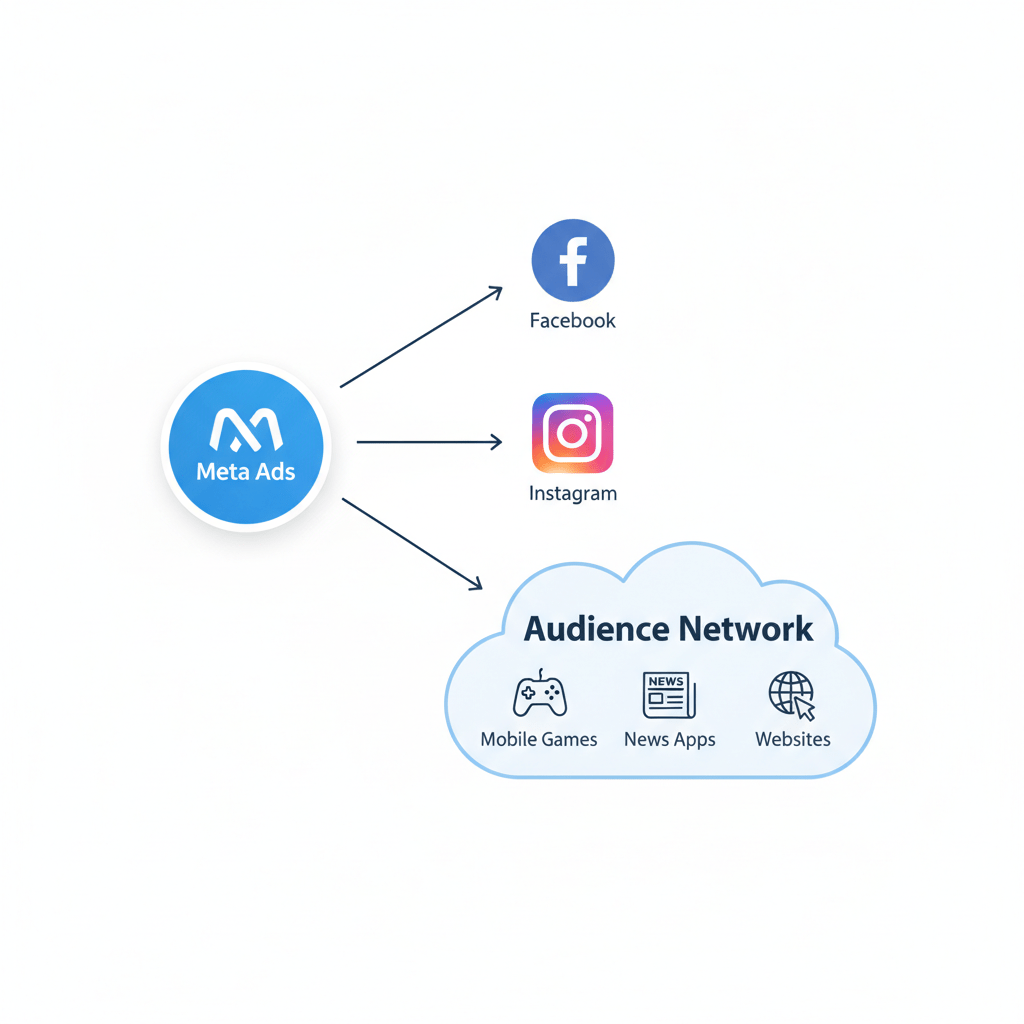
Meet Sarah. Sarah runs a small online store selling beautiful, handmade jewelry. She’s poured her heart and soul into her designs and her website. To find customers, she started using Meta ads, putting aside a small budget each day to show her creations on Facebook and Instagram. (audience network in meta ads)
But something strange was happening.
She was getting clicks—lots of them, according to her Ads Manager. But her sales weren’t going up. Her budget was just… vanishing. Confused, she dug into her reports and found the culprit. A huge chunk of her money was going to something called the “Audience Network.”
“What is that?” she wondered. “Is it a scam? Am I just paying for tiny ads in random games that kids click by accident?”
Sarah’s story is incredibly common. Many advertisers see the audience network in Meta ads as a black box, a mysterious void that eats money and gives back very little. But is it really a foe to be feared, or a misunderstood friend?
Let’s be clear: the Audience Network can be a powerful tool, but only if you understand what it is and how to use it. It’s not just a checkbox to leave ticked. It’s a prime example of where human-AI collaboration for creators becomes essential. You provide the smarts and the why; Meta’s AI provides the where.
In this guide, we’re going to break it all down in simple terms. We’ll explore what the Audience Network is, how it really works, and how you can stop wasting money and start using it to grow your business.
What Is the Audience Network in Meta Ads, Anyway?
Imagine Facebook and Instagram are Meta’s giant, popular shopping malls. They own them, they control everything, and they’re packed with people. Most of the time, you want your ads in these malls.
But what about all the other places people hang out online? Think about:
- The thousands of mobile games people play.
- The news apps they read every morning.
- The lifestyle and hobby websites they browse.
The Audience Network in Meta ads is simply Meta renting ad space in those other places. It’s a massive collection of thousands of third-party mobile apps and websites where Meta can show your ads.
This means your ad—the same one you designed for Facebook—could show up as a banner at the bottom of a weather app, as a video ad between levels of a popular game (these are called “interstitials”), or as a “rewarded video” where a user chooses to watch your ad in exchange for in-game coins.
Why Does Meta Even Bother With This?
So, why would Meta want to place your ads on other people’s apps? Two big reasons:
- Massive Reach: There are only so many ad-sized spaces on Facebook and Instagram feeds. As more businesses advertise, those spaces get crowded and expensive. The Audience Network opens up millions of new ad slots, giving Meta a much larger inventory. This can often lead to cheaper clicks or views for you.
- Finding People Everywhere: Your ideal customer isn’t only on Facebook. They might spend 30 minutes every morning playing Words with Friends or reading articles on a news app. The Audience Network allows Meta’s AI to follow that user (in a privacy-safe way) and show them your ad when they’re most likely to pay attention, no matter which app they’re using.
This system is a core part of Meta’s creative workflow automation. You give Meta your ad creative and your budget, and its powerful AI algorithm automatically finds the cheapest, most effective places to show it across all its properties—including the Audience Network.
The Big Debate: Is the Audience Network Wasting Your Money? (audience network in meta ads)
This is the big question, and the answer is… maybe. If you just check the box for “Advantage+ Placements” (which used to be called Automatic Placements) and never look back, you are probably wasting money.
This is what was happening to Sarah. Her beautiful, static image ad for a $200 necklace was being shown as a tiny banner in a fast-paced game. People were accidentally clicking it while trying to play, landing on her site with no intention to buy, and then leaving immediately. This gave her a high click-through rate (CTR) and a terrible conversion rate.
This is the dark side of the audience network in Meta ads. Without human oversight, the AI will just find the cheapest clicks, not necessarily the best ones.
The “Accidental Click” and Brand Safety Problem
The Audience Network’s reputation suffers from a few key issues that you need to be aware of:
- Low-Quality Placements: Let’s be honest, some apps are just built to farm ad clicks. They place banner ads right where your thumb goes, or they trigger full-screen pop-ups that are hard to close.
- Brand Safety: Do you want your premium jewelry brand appearing in a low-quality, “get-rich-quick” app? Or on a political news site you don’t agree with? If you’re not careful, it can happen.
- Wrong Format, Wrong Time: A “rewarded video” ad is a perfect example. A user agrees to watch your 30-second ad to get a reward. They are in a captive, positive mindset. A banner ad in that same game is an interruption and is often ignored or accidentally clicked. The context is completely different.
This is why you can’t just “set it and forget it.” You, the human, need to be the creative director. You need to guide the AI.
How Human-AI Collaboration Makes the Audience Network Work
So, how do we fix Sarah’s problem? We don’t just turn the Audience Network off. That’s leaving money on the table. Instead, we use it smarter. We combine our human strategy with Meta’s powerful automation.
This is the essence of human-AI collaboration for creators. The AI is a tool, like a very fast, very powerful, but slightly dumb assistant. It needs you to give it clear instructions.
Step 1: Give the AI the Right Creative Fuel
The biggest mistake is running the same exact ad on your Instagram Feed and on the Audience Network. An ad designed to blend into a social feed looks totally out of place as a pop-up in a game.
Your first job is to embrace AI and creativity to make ads specifically for the Audience Network.
- For Banner Ads: Create simple, bold, and clear banners. Your logo and a three-word offer. That’s it.
- For Interstitial Ads: These are the full-screen ads. They need to be visually stunning and have a very clear “X” to close them (if they’re not video).
- For Rewarded Video: This is the golden goose. Create a 15-30 second video that clearly shows your product’s value. Since the user agreed to watch it, you have their full attention! Show your jewelry sparkling, show how it’s made, or show a customer’s happy reaction.
Step 2: Use AI Tools for Creative Workflow Automation (audience network in meta ads)
You don’t need to be a video editor or a graphic designer to do this. There are amazing AI tools that help automate this creative process.
- Meta’s Advantage+ Creative: Inside Ads Manager, Meta’s own AI will suggest simple improvements. It can automatically apply filters to your images to make them pop, or it can re-format your single image into different aspect ratios to fit different placements. This is a basic form of creative workflow automation that you should definitely use.
- Canva Magic Studio: Canva is a creator’s best friend. You can design one ad, and then use its “Magic Resize” tool (powered by AI) to instantly create versions for banners, videos, and different app layouts. Its AI tools can also help you write punchier text or even generate simple videos from your static images.
- InVideo / Veed.io: These are online video editors that use AI to make video creation fast. You can upload your product photos, and their AI will help you turn them into a professional-looking video ad, complete with music and text, in minutes. This is perfect for creating those high-impact rewarded video ads.
Step 3: Actively Manage Your Placements (The How-To Guide)
Once you have your new, placement-specific ads, it’s time to tell Meta’s AI how to use them.
- Don’t Use “Advantage+ Placements” Blindly. When you’re setting up your campaign, instead of “Advantage+ Placements,” choose “Manual Placements.”
- Deselect Everything. Uncheck Facebook, Instagram, and Messenger. Now, select only the Audience Network.
- Get Granular. This is the most important part. Below the Audience Network checkbox, you’ll see options.
- Uncheck “Audience Network banners and interstitials.” This is where most of the accidental clicks and low-quality traffic live.
- Keep “Audience Network rewarded videos” checked. This is your sweet spot. You are now telling Meta to only show your ad to people who have actively chosen to watch it in exchange for a reward.
- Keep “Audience Network native” checked. This format is designed to blend in with the app’s content, making it look less like a disruptive ad. It’s worth testing.
- Use Block Lists. After your campaign runs for a few days, go to your “Breakdown” report and select “Placement.” You’ll see a list of all the exact apps and websites your ad was shown on. If you see an app that is spending a lot of money with zero results (like that “Dictionary app” Sarah found), you can add it to a “Block List” to prevent your ads from ever showing there again. This is you teaching the AI.
By doing this, you’ve transformed your strategy. You’ve gone from “spamming everyone” to “smartly targeting engaged users in a specific context.”
Real-World Success with the Audience Network
Still skeptical? Let’s look at a few examples of this working in the real world.
- Case Study 1: Gameloft (The App Publisher) Gameloft, the company behind huge mobile games like Asphalt, is a major user of the Audience Network. They use it on both sides. First, they show ads in their games (like rewarded videos) to earn money. Second, they run ads on the Audience Network to get people to download their new games. They know that people playing a car racing game are probably open to trying another car racing game. By targeting rewarded video slots, they get high-quality installs at a lower cost.
- Case Study 2: Our friend Sarah (The E-commerce Story) After her discovery, Sarah created a new campaign. She made a simple 15-second video showcasing her new earring collection using an AI video tool. She set the campaign to “Manual Placements” and selected only “Audience Network Rewarded Videos.” Her goal wasn’t direct sales, but app installs for her new store app. The result? Her cost-per-install dropped by 40%, and the users who came from those ads were 2x more likely to add an item to their cart. It became a successful part of her marketing.
- Case Study 3: A Major News Publisher (The Content Example) A well-known online newspaper (similar to The Washington Post or The Guardian) uses the Audience Network to monetize its mobile app. As mentioned in reports from publishing experts, they use “native” ad formats that slide into the news feed, looking just like another article. This is less annoying for readers and provides a high-quality ad spot. This demonstrates that AI and creativity can be used to make ads that fit the user’s experience rather than disrupt it.
- Example of Iteration in Prompt Engineering: From “Meh” to “Wow”
Your Final Checklist: Taming the Audience Network Beast (audience network in meta ads)
The audience network in Meta ads is not your enemy. It’s a powerful, AI-driven tool that can be misused. To make it your ally, you just need a smart, human-led strategy.
Here is your simple, step-by-step plan:
- Define Your Goal: Is it cheap clicks for brand awareness? App installs? Video views? The Audience Network is great for these. It is less great for immediate, high-ticket sales.
- Separate Your Campaigns: Don’t lump Audience Network in with your Facebook/Instagram feed ads. Create a separate ad set (or even a separate campaign) just for Audience Network placements.
- Customize Your Creative: This is the most important step! Embrace human-AI collaboration for creators. Use tools like Canva or InVideo to create specific, high-impact video ads (15-30 seconds) and simple, clear native ads. Stop using your square Instagram photo as a banner ad.
- Be Picky with Placements: Start by only selecting “Rewarded Videos” and “Native.” Avoid banners and interstitials until you’re more advanced.
- Monitor and Block: Check your Placement report weekly. Find the apps and sites that are wasting your money and add them to your account’s “Block List.” This is you actively training the AI.
By following these steps, you take control. You stop being a victim of the algorithm and start using the algorithm. You turn a potential money pit into a predictable, scalable source of new customers.
Sarah’s store is thriving now. She still spends money on the Audience Network, but now, every dollar she spends there is smart, targeted, and effective. You can do the same.
Meta Ads Active But Not Spending? Your 5-Minute Fix-It Guide
Sources Used:


